

Part of NewFormat AB Portal
 
OpenFormat
Products and Services
Offerings / Promotions / Prices
Guides and Datasheets
Customer Contact Form
Home/NewFormat
NewFormat AB
PDF standards make the world work
|
|
Our solutions are based on
tested, reliable, and highly accessible software solutions.
NewFormat is Appointed Reseller and Solution Partner in
Nordic (Sweden, Denmark, Finland, Iceland, Norway)
and
Baltic Region (Estonia, Latvia, Lithuania)
of leading technology for accessible PDF from axes4.
|

axes4 / axesFlip
Accessible PDF (PDF/UA) Simply Done
Solutions for making accessible PDF (PDF/UA)
We make PDF documents accessible to everyone
for a more accessible and better world
axesFlip is "PDF/UA-Ready"
Create, show, read, share, publish and navigate in
PDF/UA compatible PDF documents
|

Accessible PDF
A fully PDF/UA compliant PDF can be just as
accessible as a WCAG compliant website
|

Automate creation of accessible high-volume PDF documents,
from live data/databases and central IT systems,
in compliance with legal requirements
EAA compliant
Ensures that your PDFs comply with the requirements of
the European Accessibility Act (EAA)
WCAG and PDF/UA compliant
Accessible PDF documents compliant with
ISO Standard 14289 (PDF/UA) and
relevant parts of W3C/WCAG

axesFlip is the solution when you want to convert large volumes of
PDF documents into digitally accessible PDF documents
efficiently and in compliance with legal accessibility requirements
without compromising on accessibility and lean processes
Why axesFlip?
With the introduction on June 28, 2025,
of the European Accessibility Act (EAA) as
the Swedish Act on Accessibility of
Certain Products and Services, SFS2023:254,
also transactional documents must be digitally accessible.
This includes documents that are created as part of business processes.
In principle, all documents must be designed in a way that ensures
they are accessible to all users, including people with disabilities.
axesFlip is the solution to convert high volumes of PDF documents
with similar layouts to accessible PDF documents;
such as invoices, tickets, bank statements, boarding cards, …
Integrate axesFlip into your existing PDF processes and
create masses of accessible PDF documents using
customized document templates.
What makes axesFlip unique
Related Products:
|

axesFlip Video Demonstrations
Video recordings will be provided here when available
On-line Demonstration
Reserve online-demonstration of axesFlip
|
axes4 Customer References
More than 1,000 customers in 15 countries
rely on axes4 solutions to efficiently create
accessible PDF documents, meet legal requirements,
and sustainably optimize existing document processes:
|
Products
|
|
axesFlip
Automated creation of accessible
high-volume PDF documents
from live data/databases and central IT systems
Accessible PDF documents compliant with
ISO Standard 14289 (PDF/UA) and
relevant parts of W3C/WCAG recommendations
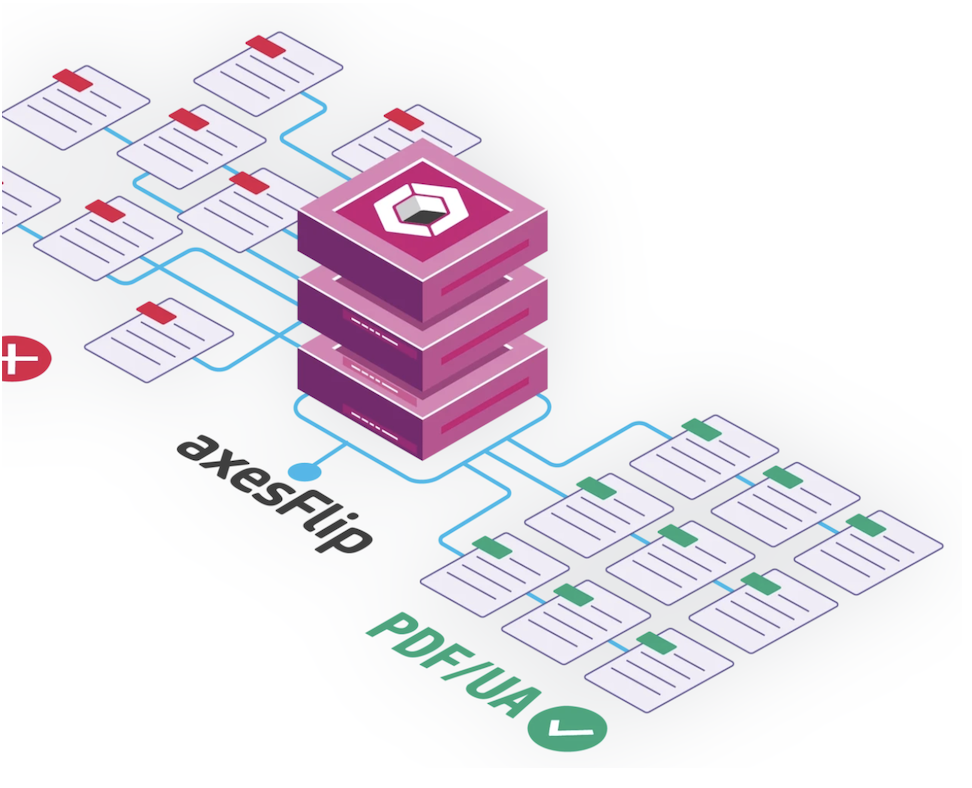
axesFlip Workflow
The automation process starts with existing PDF files
and then generates accessible PDF documents
by using a precisely preconfigured template

Click on picture
Benefits
- Efficient
- Ideal for all automated processes with PDF output.
Thanks to the complete automation,
an efficient and cost-saving creation of
barrier-free documents is achieved.
- Scalable
- With a template-based solution such as axesFlip,
the amount of documents is fully scalable on
the customer side and can be adapted to
a wide range of requirements.
- Versatile use
- axesFlip saves time and money:
Your templates are tailored exactly to
the specific needs of your organization.
Each document template can be flexibly expanded
and covers a variety of similar PDF documents;
so you need fewer templates to achieve more.
- Legally compliant
- High-quality accessible documents are
created with axesFlip within a very short time.
You will achieve legally compliant accessibility
requirements for automated PDF documents
without changing your existing processes.
Key components and advantages
of the axesFlip system
axesFlip Designer

axesFlip Designer is a stand-alone program that
runs on any standard Windows PC to:
- analyze your PDF documents, and
- create a template (a text file) in JSON format.
The JSON is generated by axesFlip Designer
and displayed in a user-friendly interface.
The template describes the elements of the PDF document
(logo, body text, tables, etc.) in all their complexity.
The axesFlip Designer displays various types of errors,
such as syntax errors when entering code.
It is not a full-fledged debugger, but there is
no need for a debugger in the context of axesFlip.
Requirements on operator of axesFlip Designer:
The basic requirements are logical and structured
thinking as well as good knowledge in the field of
accessible PDF documents.
Software development skills (such as JavaScript or C#)
are not necessary.
The level of requirements is roughly comparable to
someone who is an Excel power user and can write
complex formulas in Excel.
Training materials and advice
can be provided upon request.
axesFlip Worker
axesFlip Worker requires high throughput,
so a Windows or Linux server is recommended.
For very high throughput requirements,
multiple servers can also be parallelized.
The axesFlip Worker is an execution engine
that takes two inputs:
- a non-accessible PDF document
(as a file or a stream)
- a template authored with the axesFlip Designer
With this as input, the axesFlip Worker converts
non-accessible PDF documents to accessible PDFs
that are fully WCAG and PDF/UA compliant;
cleanly tagged, readable by assistive technologies
such as screen readers, and of the highest quality.
You have several options for running
axesFlip Worker in your system environment:
- as a Command Line Interface (CLI)
- as a REST Service
- as an SDK integrated in your custom software
axesFlip Worker is designed to batch-convert
thousands of similar PDFs in a row.
axesFlip reaches a performance of
dozens to hundreds of pages per second,
depending on the complexity of the PDF document.
axesFlip Architectural Building Blocks
The architecture of axesFlip that combines proven
axes4 building blocks with new components.
The core of axesFlip consists of three main parts:
- the technical analysis and processing of
PDF documents (as in axesPDF).
- the basic architecture for so called
nodes (feature elements) that
can be concatenated into a graph.
Nodes with various functions such as
element selection, sorting or tagging
are available or can easily be added
without changing the architecture.
- a custom expression language that
allows you to capture PDF objects
in a simple and effective way.
The expression language is
flexible, powerful and targeted
at its specific use case.
Advantages of the axesFlip approach
- axesFlip is designed for documents that have
a similar layout but different content
(e.g., a bank statement).
axesFlip is not suitable for static documents,
which are better tagged manually only once.
Since forms are static,
they are not a use case for axesFlip.
- axesFlip can correctly tag layout tables and
handle dynamic content elements such as inserts.
Even in complex scenarios, such as serial documents
where customer A receives an insert and customer B
does not, axesFlip processes all variants
reliably and without barriers.
Elements in a PDF document can be
selected dynamically (e.g. depending on their
relative position to other elements).
- axesFlip can tag complex documents
(e.g. tables, lists or combinations thereof)
completely and technically correctly.
axesFlip can, for example,
tag tables correctly regardless of
whether they have 4 or 40 lines.
- Images and graphics can be marked in axesFlip
and tagged accordingly (typically as "Figure").
- Templates can be created efficiently and flexibly
using the node graph and the expression language.
Thanks to its innovative technology,
axesFlip is particularly flexible
when it comes to layout variations.
As a guideline,
anything that is perceived by a person as
having the “same” layout can be processed
using same template.
With a single template, many types of documents
can be made accessible. Quotes, order confirmations,
invoices, credit notes, reminders, in several languages,
share often the same basic layout,
but differ in terms of their title and a few other details
and therefore can have a single template.
A bank statement and a loan application
look completely different and therefore require
two different templates.
- axesFlip does not currently support MathML.
However, axesFlip has an architecture that allows
new components to be added easily and flexibly.
If the need arises, a MathML node can be added.
Furthermore, it is unlikely that formulas will appear
as dynamic content in serial documents.
Static formulas can be tagged as formulas with axesFlip.
System Requirements
- Minimum hardware requirements:
- Multi-core processor;
4 cores and 3 GHz clock speed
- 16 GB RAM
- no special requirements for
storage or network interface
- axesFlip runs on the basis of .NET and works on:
- all current Windows operating systems
(several versions of Windows Server,
Windows 10 and 11)
- various Linux operating systems
For more details see:
|
NewFormat AB
All content © copyright NewFormat AB. All rights reserved.
All product names, trademarks and registered trademarks
are property of their respective owners.
axes4 Partner
|
